 Spectral Web Services
How to interpret your Algolia search report
...and some other FAQ about our Advanced Search for Ghost

Want great full-text search on your Ghost site, for free, set up in 14 minutes? Say no more!
 Cathy Sarisky, Ghost Expert
What's this report in my email?
If you follow along with the setup directions directions, and don't turn notifications off, Algolia will send you a weekly report on your search utilization, every Monday. Here's how to interpret it:
Utilization
The top section shows how much of your free usage you've worked through. The screenshot below is a fairly high-traffic site. They're not leaving the free tier any time soon. This section is worth keeping an eye on, because if you're approaching the monthly free limits, you should be expecting a bill.
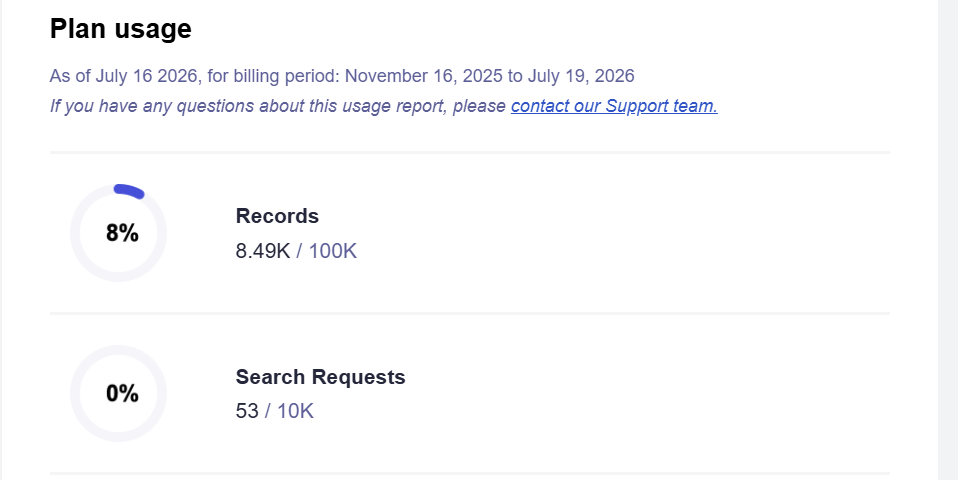
Tip: You can reduce your search requests by setting search as you type="false" inside the <sws-search> configuration (in your code injection). This avoids doing multiple searches as the user is typing, and instead runs one search when the user presses enter or clicks the submit button. Or, if you're seeing that you have a lot of free search requests, consider setting it to true for a blindingly fast search.
Analytics
Next, the email includes what terms were searched. Conveniently, it calls out terms that aren't getting results. These results can be useful for understanding what your readers want to read but can't find, and it's also worth a glance to make sure that you aren't seeing "zero results" for terms you know you have written about. (Since this is a weekly report, if your first article is two days ago, that's not yet cause for concern.)
One tip to watch out for: The report includes each search index separately. Your Algolia search database has a posts index (which includes pages if you chose that option), and optionally tags and authors indices. You'll probably want to focus on the posts results. The other two indices may give a lot of zero results, particularly if you don't have a lot of authors and are a sparse tagger. This doesn't impact the user experience – searchers will still see post/page results, even if you don't happen to have a tag that matches their search terms. Only zero results on the posts index are worth paying any attention to, for most site owners.
Other FAQ
How can Spectral Web Services offer free search for Ghost?
My costs to host search are pretty modest. The search app itself loads from CDN, so all I need to host is the functions that catch webhooks from your Ghost site and translate for Algolia, plus the back end for the buttons in the Tools dashboard (which you really aren't going to click very often). How many function calls is that? It's one per time you publish or edit a post. In other words, not very many, for most sites.
I don't have to host or maintain the search database, since I'm having you bring your own Algolia keys instead, and nearly everyone I've worked with fits in Algolia's free tier. So I don't need to charge you for that, and Algolia probably won't, either.
Can I configure the appearance of the Spectral Web Services search tool?
Absolutely! See the table below for a list of properties that can be passed in. If there's something you want that isn't included here, please let me know!
| Attribute | Default | What it does |
|---|---|---|
theme | auto | light / dark / auto (follows the visitor’s OS setting) |
layout | tabs | tabs, or stacked to show all sections at once |
show-image | true | "false" hides post and author images |
show-author | true | "false" hides the author byline on results |
show-date | true | "false" hides the published date on results |
image-size | 100 | thumbnail size in pixels |
pub-date-filter | false | "true" adds a publication-date range filter |
search-as-you-type | false | "true" enables debounced live search as you type |