Introducing the newsletter digest builder!
Want to send your newsletter as a digest, instead of sending a single article? I got you.
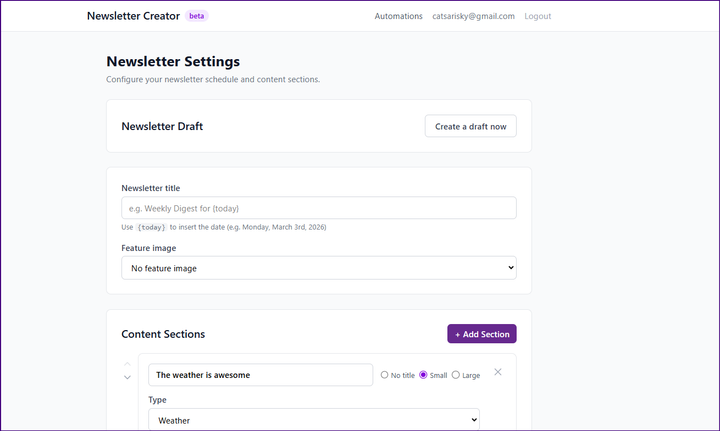
Today, I'm pleased to invite you to try out my Ghost newsletter digest builder. It will read your recent posts and/or pages and create a newsletter draft for you. The eventual plan is that you'll be able to schedule it to run unattended, but right now it must makes drafts when you click the button, because it's beta (er... at best), and you shouldn't let is run unattended before testing it out.
Speaking of safety, the tool will prompt you for a contributor staff token. That's what I recommend you give it. A contributor staff token can create a post draft, but can't edit other people's content, send a newsletter, mess with your members, or otherwise make trouble. You can give it an admin api key or higher level token, but for creating drafts, it doesn't need more privileges, so please don't give it more!
To make a contributor and get your token:
- Go to /ghost > settings > staff and click 'invite'. Send an invite to an email address you control. (Tip: many email providers will deliver something like [email protected] to [email protected], which is handy if you need another email address but don't have one.)
- Log out of Ghost (or do everything below in a different browser that isn't logged in).
- Click (or paste into the alternate browser) the invitation link received in email. Make the contributor account. It'll be the author of the newsletter (although you can change it), so consider a generic name.
- Once you've logged in your contributor, click the 'person' icon in the lower left corner and open your profile from the menu that opens.
- Your 'staff user token' should be at the bottom of the profile page.
(You only have to do that ONCE. The digest builder will save it for you!)
Once you've got your token, head back to the staff builder and follow the setup directions!
Weather
Want to send the weather with your newsletter? I got you. You'll find a weather content section. To get your latitude and longitude, head over to Google Maps and add a point. The popup will give your coords:
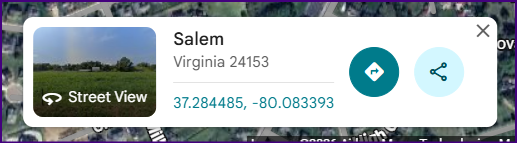
Note that I currently only use US weather via the weather.gov API, so although you can enter non-US coordinates, they won't actually generate a weather section.
Feedback wanted!
The digest builder is very much beta software. I'd love to know what you think of it! What didn't it do that you wanted it to? (Besides scheduling. That's coming.) What other types of content should it let you pull in? Any bugs? Leave a comment below or share your feedback with me wherever we talk. Thanks!

Looks like you aren't a member of the site yet! You'll need to make an account before you can play with the digest maker! We need you to log in so that we can store your digest settings. You're welcome to unsubscribe from the newsletter if you don't want to receive it.
And of course, we never sell or trade your email with anybody! (Ewww...)
Ready to build an awesome newsletter digest? Click the button below and let's get started!